127.0.0.1 - - [04/Jul/2024:23:46:02 +0900] "GET /?data=test HTTP/1.1" 403 162 "-" "curl/8.5.0"
127.0.0.1 - - [04/Jul/2024:23:46:08 +0900] "GET /?data=hello HTTP/1.1" 200 615 "-" "curl/8.5.0"
쿼리 파라미터 하나만 다른 두 요청이다. test를 보낸 쪽은 403, hello를 보낸 쪽은 200을 받았다. 앞 글에서는 ModSecurity가 무엇인지 개념만 짚었다. 이번에는 실제로 요청을 막는 장면까지 가 봤다.
이 글에서는 Ubuntu 컨테이너 하나에 Nginx와 ModSecurity를 깔고, 위 로그가 나오기까지와 막힌 요청이 audit log에 어떻게 남는지를 정리한다.
Ubuntu 컨테이너 하나에 전부 올린다
구성은 단순하다. Ubuntu 컨테이너(A)를 하나 띄우고, 그 안에 앞서 다뤘던 Nginx Proxy Manager를 구성한 뒤 ModSecurity를 설치한다.
# 우분투 컨테이너 실행
docker run -it --name my-ubuntu-container ubuntu:latest /bin/bash

# NGINX Proxy Manager 설치
curl -fsSL https://deb.nodesource.com/setup_20.x | bash -

# apt install -y nodejs
ModSecurity는 Nginx 모듈과 룰셋, 두 패키지다
ModSecurity 관련 패키지를 찾아보고, Nginx용 모듈과 OWASP CRS(Core Rule Set)를 설치한다. 엔진(libnginx-mod-http-modsecurity)과 규칙(modsecurity-crs)은 따로 온다. 엔진만 있으면 아무것도 막지 않고, 규칙만 있으면 읽어 줄 쪽이 없다.
# ModSecurity 설치
apt-cache search modsecurity
apt install libnginx-mod-http-modsecurity
apt install modsecurity-crs
apt install vim

ls /usr/share/modsecurity-crs/
# [실행결과]
# owasp-crs.load  rules  uti

cat /usr/share/modsecurity-crs/owasp-crs.load
# [실행결과]
# ##
# ## This file loads OWASP CRS's rules when the package is installed
# ## It is Included by libapache2-mod-security2
# ##
# Include /etc/modsecurity/crs/crs-setup.conf
# IncludeOptional /etc/modsecurity/crs/REQUEST-900-EXCLUSION-RULES-BEFORE-CRS.conf
# Include /usr/share/modsecurity-crs/rules/*.conf
# IncludeOptional /etc/modsecurity/crs/RESPONSE-999-EXCLUSION-RULES-AFTER-CRS.conf
owasp-crs.load에 규칙이 직접 들어 있지는 않다. Include 지시어로 규칙 파일들을 가리킬 뿐이다. 설정(crs-setup.conf) → 사용자 예외 → 본 규칙(rules/*.conf) → 응답 쪽 예외 순서다.
Nginx를 띄우고 로그를 열어 둔다
# nginx 설치
apt install nginx

# nginx 실행
nginx
# [실행결과]
# nginx is running

# nginx 프로세스 확인1
ps aux | grep nginx

# nginx 프로세스 확인2
service nginx status

# 80포트 리스닝 중인지 확인
ss -tuln | grep 80

# log 확인하기
tail -f /var/log/nginx/error.log
tail -f /var/log/nginx/access.log
tail -f가 터미널을 붙잡고 있으니, 요청은 다른 터미널에서 같은 컨테이너로 들어가서 보낸다.
# 다른 터미널에서 우분투 컨테이너 진입
docker exec -it my-ubuntu-container /bin/bash

# Nginx 상태 확인
curl -I http://localhost
# 우분투 컨테이너에서 access log 확인 -> 정상
test가 들어간 요청만 403을 받는다
tail -f로 지켜본 access log다. HEAD는 curl -I, GET은 그냥 curl로 보낸 요청이다.
127.0.0.1 - - [04/Jul/2024:23:45:31 +0900] "HEAD /?data=test HTTP/1.1" 403 0 "-" "curl/8.5.0"
127.0.0.1 - - [04/Jul/2024:23:45:55 +0900] "HEAD /?data=hello HTTP/1.1" 200 0 "-" "curl/8.5.0"
127.0.0.1 - - [04/Jul/2024:23:46:02 +0900] "GET /?data=test HTTP/1.1" 403 162 "-" "curl/8.5.0"
127.0.0.1 - - [04/Jul/2024:23:46:08 +0900] "GET /?data=hello HTTP/1.1" 200 615 "-" "curl/8.5.0"
메서드와 상관없이 data=test면 403, data=hello면 200이다. 여기까지는 Nginx access log라서 “막혔다"는 사실만 보인다. 왜 막혔는지는 ModSecurity의 audit log에 따로 남는다.
audit log는 막힌 요청만 기록한다
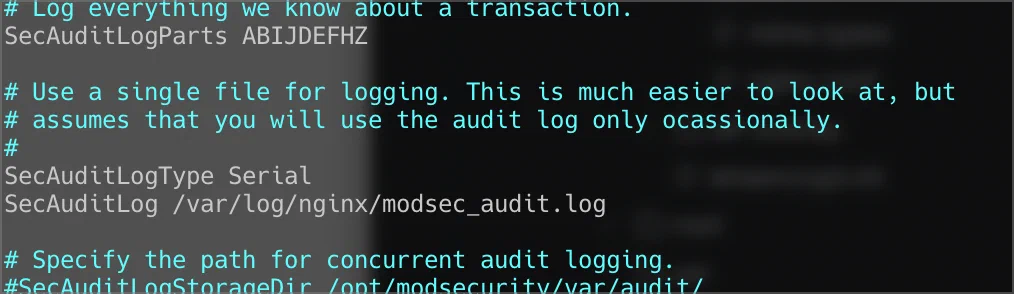
audit log 경로는 /etc/nginx/modsecurity.conf의 SecAuditLog 항목에서 확인할 수 있다.
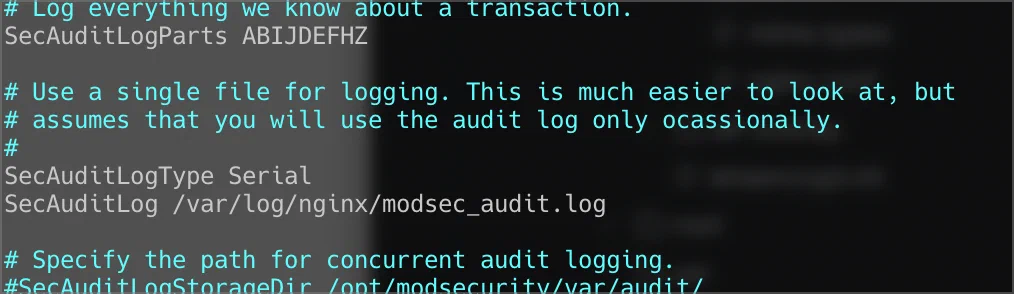
경로는 /var/log/nginx/modsec_audit.log였다. 이 파일을 tail -f로 열어 두면, 규칙에 걸리지 않는 요청을 보낼 때는 아무것도 찍히지 않다가 규칙에 걸리는 요청이 들어오는 순간 아래 로그가 나온다.
---AU9HhbBg---A--
[04/Jul/2024:23:51:11 +0900] 172010467164.403561 127.0.0.1 57376 127.0.0.1 80
---AU9HhbBg---B--
HEAD /?data=test HTTP/1.1
Host: localhost
User-Agent: curl/8.5.0
Accept: */*

---AU9HhbBg---D--

---AU9HhbBg---F--
HTTP/1.1 403

---AU9HhbBg---H--
ModSecurity: Access denied with code 403 (phase 1). Matched "Operator `Contains' with parameter `test' against variable `ARGS:data' (Value: `test' ) [file "/etc/nginx/modsec/modsec_test.conf"] [line "1"] [id "1234"] [rev ""] [msg "param contains test"] [data ""] [severity "0"] [ver ""] [maturity "0"] [accuracy "0"] [hostname "127.0.0.1"] [uri "/"] [unique_id "172010467164.403561"] [ref "o0,4v12,4"]

---AU9HhbBg---I--

---AU9HhbBg---J--

---AU9HhbBg---Z--
---AU9HhbBg---X-- 줄이 섹션 구분자이고, 뒤 글자가 스크린샷의 SecAuditLogParts ABIJDEFHZ와 대응한다. 읽을 곳은 세 군데다.
B: 들어온 요청 헤더.
HEAD /?data=testF: 돌려준 응답 헤더.
HTTP/1.1 403H: 판정 이유.
/etc/nginx/modsec/modsec_test.conf1번째 줄의 규칙id 1234가ARGS:data값에test가 포함된 것을 보고(Contains)phase 1에서 403으로 끊었다. 메시지는param contains test.
phase 1은 요청 헤더를 받은 직후 단계다. 쿼리 스트링은 요청 줄에 들어 있으니 본문을 읽기도 전에 판정이 끝난다.
테스트한 건 직접 만든 규칙 하나다
403이 나왔다고 WAF가 다 된 것은 아니다. 이번에 확인한 것은 modsec_test.conf에 둔 테스트 규칙(id 1234) 하나가 걸리는 장면이다. 앞에서 설치한 OWASP CRS의 규칙이 SQL Injection이나 XSS 같은 실제 공격 패턴을 막는지는 아직 보지 않았다. owasp-crs.load의 주석에도 “libapache2-mod-security2에서 Include된다"고 적혀 있으니 Nginx 쪽에서 CRS를 읽게 하는 연결은 따로 확인해야 한다.
컨테이너를 이미지로 굳힐 때는 Nginx가 포그라운드에서 돌아야 컨테이너가 바로 종료되지 않는다. 아래 둘 중 하나를 쓴다.
# 컨테이너 시작시 Nginx가 포그라운드에서 사용될 수 있도록 하는 명령어들(아래 중 한가지 선택)
CMD ["nginx", "-g", "daemon off;"]   # Dockerfile에 쓸 때
nginx -g 'daemon off;'               # 쉘에서 직접 띄울 때
정리
ModSecurity는 엔진과 규칙이 따로 온다. Nginx 모듈과 CRS를 각각 깔고 연결해야 한다.
access log는 403이라는 결과만, audit log는 어느 규칙이 왜 막았는지를 보여준다.
이번에 막힌 건 테스트 규칙 하나다. CRS 규칙 검증은 다음 단계다.
?data=test 하나 막는 데 생각보다 많은 파일을 거쳤다. 그래도 audit log의 H 섹션을 한 번 읽어 두면, 나중에 CRS가 정상 요청을 막았을 때 어디부터 볼지는 안다.
참고자료
ModSecurity (owasp-modsecurity) — ModSecurity v3 엔진(libmodsecurity)
ModSecurity-nginx — Nginx 커넥터 모듈과
modsecurity,modsecurity_rules_file지시어OWASP CRS —
modsecurity-crs패키지가 담고 있는 Core Rule SetModSecurity Reference Manual (v3.x) —
SecAuditLog,SecAuditLogParts, phase 설명