트레이싱 의존성 두 개가 들어간 pom.xml을 IntelliJ에서 Maven Sync했더니 Resolve dependencies에서 에러가 났다. 메시지는 이렇다.
io.opentelemetry:opentelemetry-exporter-zipkin:jar:unknown was not found in https://repo.maven.apache.org/maven2 during a previous attempt. This failure was cached in the local repository and resolution is not reattempted until the update interval of central has elapsed or updates are forced
Try to run Maven import with -U flag (force update snapshots)
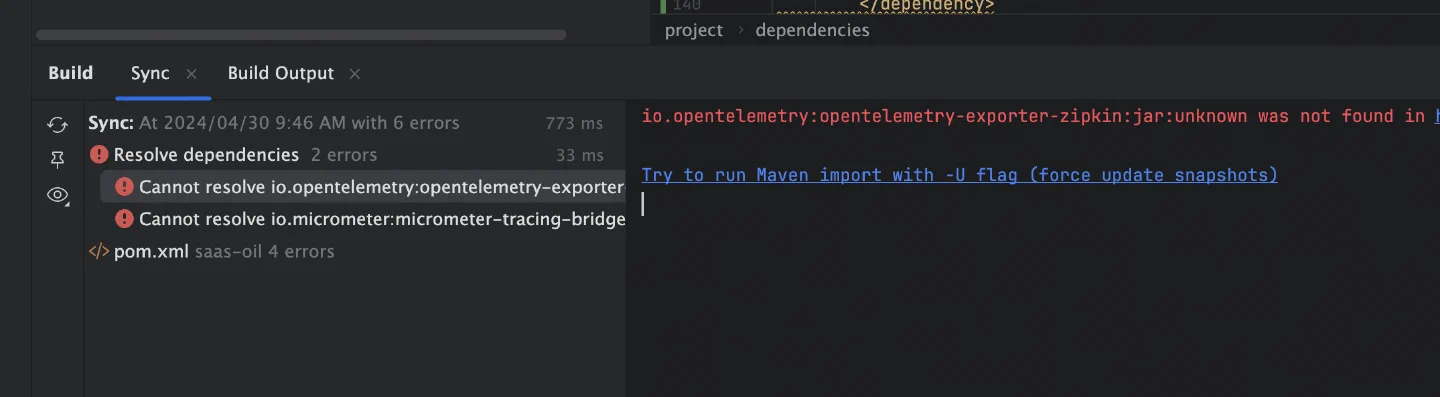
opentelemetry-exporter-zipkin과 micrometer-tracing-bridge-otel 둘 다 resolve되지 않았다. 메시지에서 눈여겨볼 단서는 IDE가 권하는 -U와 좌표 끝의 jar:unknown, 두 가지다.
실패가 캐시되어 있으면 -U로 다시 받는다
메시지 뒷부분을 보면 Maven은 이전에 이 의존성을 찾다 실패한 기록을 로컬 저장소에 캐시해 두고, central의 업데이트 주기가 지나거나 강제로 업데이트하기 전까지 다시 시도하지 않는다. 한 번 실패하면 네트워크가 돌아와도, 설정을 고쳐도 같은 에러가 반복될 수 있다는 뜻이다.
Maven 명령어에 -U 플래그를 붙이면 로컬 캐시를 무시하고 원격 저장소에서 다시 받아 온다.
mvn clean install -U
IntelliJ에서는 에러 메시지 아래 Try to run Maven import with -U flag 링크를 누르면 같은 동작을 한다. 링크 문구는 스냅샷 강제 업데이트라고 되어 있지만, -U는 스냅샷 갱신과 함께 없던 릴리스도 원격 저장소에서 다시 확인한다.
unknown은 버전이 비어 있다는 뜻이다
좌표의 버전 자리에 unknown이 찍혀 있으면, 저장소를 몇 번 다시 뒤져도 찾을 대상이 정해지지 않은 것이다. 이럴 때는 pom.xml의 해당 의존성에 <version> 태그가 있는지부터 본다. Maven 중앙 저장소에서 받으려면 구체적인 버전이 필요하다.
수정 전에는 두 의존성 모두 버전이 없었다.
<!-- 수정 전 -->
<dependency>
    <groupId>io.micrometer</groupId>
    <artifactId>micrometer-tracing-bridge-otel</artifactId>
</dependency>
<dependency>
    <groupId>io.opentelemetry</groupId>
    <artifactId>opentelemetry-exporter-zipkin</artifactId>
</dependency>
버전을 적어 넣었다.
<!-- 수정 후 -->
<dependency>
    <groupId>io.micrometer</groupId>
    <artifactId>micrometer-tracing-bridge-otel</artifactId>
    <version>1.2.5</version>
</dependency>
<dependency>
    <groupId>io.opentelemetry</groupId>
    <artifactId>opentelemetry-exporter-zipkin</artifactId>
    <version>1.37.0</version>
</dependency>
맞는 버전은 Maven Central에서 artifactId로 검색해 찾았다.
메시지가 길어서 IDE가 띄워 주는 -U 링크부터 누르게 된다. 그런데 버전이 비어 있으면 캐시는 원인이 아니라 결과다. 좌표에 unknown이 보이면 pom.xml의 <version>부터 확인하는 게 빠르다.